LESCO duplicate bill: view, print, or save PDF
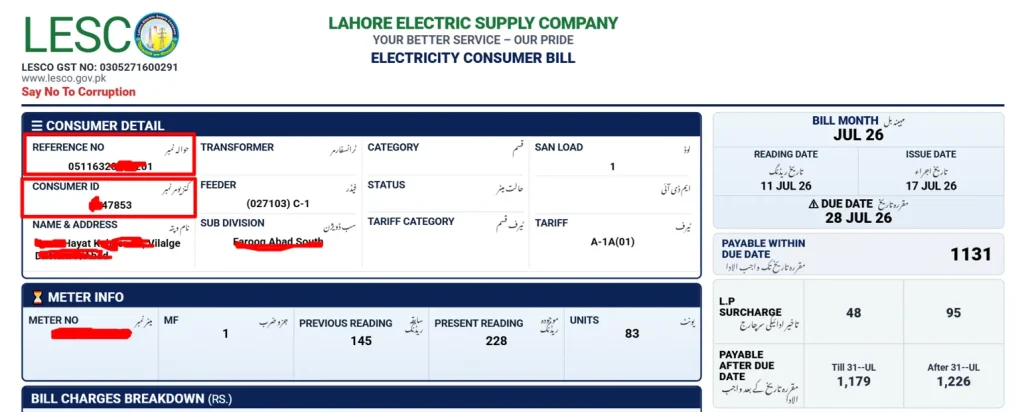
If your paper bill is late, lost, or damaged, use the reference number or customer ID from an earlier bill to open the duplicate bill result. Confirm the billing month, due date, consumer details, and payable amount before printing, saving, or paying.
اپنا 14 ہندسوں کا ریفرنس نمبر درج کریں
Enter your number to continue.
Quick answer
To get a LESCO duplicate bill, enter the reference number or customer ID printed on your old bill, select Check My Bill, and open the bill result. Use the print option on the result page to print the full bill or save it as a PDF.
Uses the public PITC page
The form prepares your reference number and opens the public PITC bill page in your browser.
Easy record keeping
Save a PDF for rent records, office reimbursements, shop accounts, or family payment tracking.
Ready to print
Once the bill opens, use Ctrl+P or the browser print menu to keep a paper copy.
How to get a duplicate bill
- 1. Find your reference number or customer ID: Look near the top section of an older LESCO bill. Do not enter the consumer name, CNIC, mobile number, address, or meter number.
- 2. Enter the digits: Type the digits without spaces or dashes. If your printed bill shows a U or R beside the reference number, leave that letter out.
- 3. Open the PITC page: The bill page opens in a new tab. If it does not open, check whether your browser blocked the new tab.
- 4. Print or save: After the bill appears, use Ctrl+P, the browser print menu, or Save as PDF.
Download or print the full bill copy
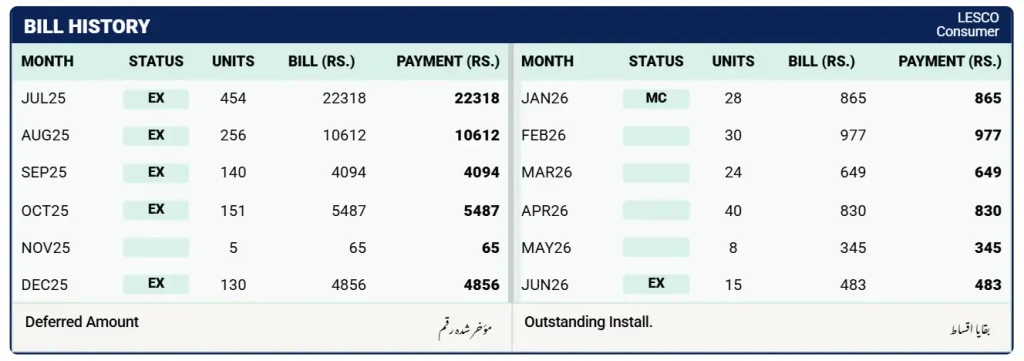
After the duplicate bill opens, print the complete page instead of only taking a screenshot. A full print or PDF copy keeps the bill layout, payment stub, due date, payable amount, and scannable codes easier to read for records or payment.
When a duplicate bill is useful
A duplicate bill is simply a fresh copy of the monthly bill. It is useful when the printed bill has not arrived, when a tenant needs a copy for rent records, or when a shop owner wants to keep monthly utility expenses in one file.
The reference number matters because it points to the correct connection. A single wrong digit can open the wrong record or return no bill at all. Before payment, compare the consumer name, address, billing month, reference number, and payable amount on the result page.
Keep the payment receipt until the amount is reflected in the next official record. If there is a reading dispute, arrears issue, or installment request, visit the relevant LESCO office instead of sending documents through unofficial websites.
LESCO service areas
Use this page for Lahore Electric Supply Company connections. If your connection belongs to another DISCO, use that company's bill page instead.
Check these details before payment
Billing month
Make sure the bill is for the month you intend to pay, especially around new bill issue dates.
Due date
If the due date has passed, review the payable after due date amount before paying.
Consumer details
Compare the name, address, tariff, and reference number before confirming payment.
Receipt
Keep the transaction ID or printed receipt until the payment status is updated.
Duplicate bill vs. bill calculator
Duplicate bill
Use this when the bill has already been issued and you need a printable copy for payment or records.
Bill calculator
Use the calculator before the bill arrives, when you only want to estimate charges from units, load, FPA, and adjustments.Open the LESCO bill calculator
Important notes
- This website is independent and is not the official LESCO or PITC website.
- It does not collect bill payments, issue corrections, or approve installments.
- Use official LESCO support for disputes, new connections, and complaints.
Duplicate bill questions
How can I download a LESCO duplicate bill?
Enter the reference number or customer ID from an older LESCO bill, open the bill result page, then use the browser print option to print the bill or save it as a PDF.
Is a printed duplicate bill accepted?
A bill copy opened from the public PITC bill page is commonly used for records and payment where a printed copy is required. Always match the consumer details before paying.
Can I use a CNIC or meter number here?
No. CNIC, name, address, phone number, and meter number do not directly open a bill on this website. Use the reference number or customer ID printed on an existing bill.
Does this website store my bill?
No. It does not store bill copies or payment information. The bill is viewed on the PITC page that opens in your browser.